Show, don’t tell: AI makes prototyping the default
Think about the last time you presented a design to someone or your team.
You probably opened Figma, walked them through a few screens, clicked between frames and explained what would happen when someone performs certain actions. You might have even said something like, “When you click this button, it opens this bottom sheet.” Everyone nods, but there’s a good chance they’re all imagining something slightly different.
This has been a pretty normal part of how I’ve approached design presentations/demos. Most of the time, I’d share static screens and explain what happens between them. Not because I didn’t think a prototype would be useful, but because I often couldn’t justify the extra effort involved in building one (Figma prototype). And from conversations and experiences working with other designers, I know I’m not alone in that. Some designers prototype almost everything they work on, but for others, myself included, it often comes down to whether the interaction is worth the time it takes to build and maintain a prototype.
That calculation has started to change for me, and while AI is a big part of it, I don’t think speed is the most interesting part.
Prototyping was usually more work than it was worth

One of the things that made prototyping more effort than I was usually willing to put in was having to maintain two versions of essentially the same design. In Figma, I’d have my original screens, which were what I’d eventually hand over to engineering, and then another set of screens that I’d need to connect together and configure to make the experience as interactive as the actual product. Every screen needed to be wired up, and every possible interaction or state I wanted to demonstrate had to be accounted for.
The other problem was what happened when the design changed. I’d have to go back and make those same changes to the prototype, which meant more work for something that might only be used for one presentation or a round of feedback. It wasn’t that I didn’t see the value in having something people could interact with. I just found it difficult to justify all that additional effort, particularly when walking someone through the screens could get the point across well enough.
Even a good prototype had its limits
Take a sign-up form, for example. In a Figma prototype, I can design multiple input fields, but I can’t interact with them in quite the same way I would in a real product. If I want to show what happens when someone enters an incorrectly formatted email, I have to design that error state separately and create that as its own flow. The same goes for an empty field, an invalid password or a successful submission. Essentially, I’m prototyping the different possible outcomes in advance rather than having the prototype respond to what someone actually does.
You can get around some of this with variables, conditionals and expressions, but it still takes time to set everything up. You’re essentially building out the different scenarios yourself. There are also other tools like Origami Studio and Protopie, which offer more flexibility when it comes to building interactive experiences, but learning and working with an entirely different tool just to test an idea introduces its own overhead. For me, that often brought me back to the same question: is all this extra work worth it?
What’s different now
Now, imagine building that same sign-up form with AI. I can type an actual email address into the field, and if the format is wrong, I get an error. I can enter a short password, leave a required field empty or try to submit the form without completing everything. These aren’t different frames I’ve designed and connected beforehand. They’re behaviours defined by rules, and the prototype responds to whatever I do.
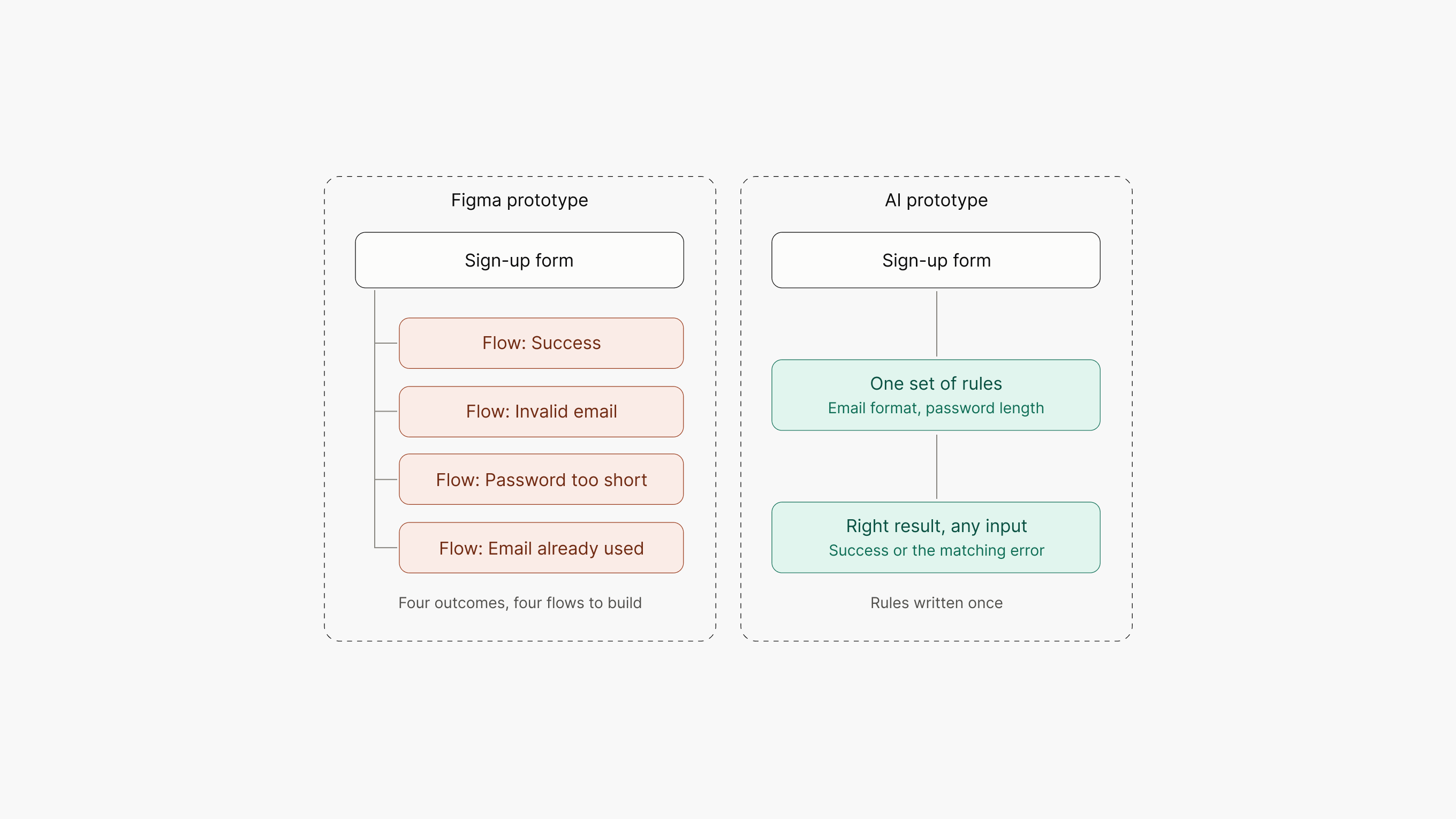
That’s the difference I’ve found most useful. Instead of designing a fixed path through a series of screens, I’m creating something that can respond to different inputs. It also changes how I approach iteration. If I want to change the validation behaviour, adjust the error message or introduce another state, I can describe the change and update the prototype without having to rebuild an entire flow. Because making those changes is much cheaper, I’m also more inclined to keep exploring an idea rather than treating the prototype as something I need to get right before showing it to someone.
Of course, there’s a limit to what this means. The form might be using front-end validation and dummy data. It’s not connected to a real authentication service or backend, but that’s not necessarily the point. A prototype doesn’t need to be a working production system. It needs to behave closely enough to the intended experience for someone to interact with it and give useful feedback.
There’s also something interesting about the feedback
This is another thing I’ve found interesting about working with interactive prototypes. When you share a Figma file with someone, you’re giving them access to a lot more than the experience you’re trying to get feedback on. They can see the entire canvas, other screens, neighbouring explorations, component names and all sorts of details that might have nothing to do with what you’re presenting. Naturally, their attention can move around, and the conversation can end up focusing on things you weren’t necessarily looking to discuss.
A working prototype changes that dynamic a little. When someone interacts with it, they’re focused on the experience itself. They tap, type, try different things and experience the flow as someone using the product would. Instead of having to explain what should happen, you can watch what they expect to happen. You can see where they get stuck, what confuses them and which parts of the experience don’t quite make sense.
I think that’s a much more useful starting point for a conversation about the design. The benefit isn’t just that you can build something faster. It’s that you can get people to engage with the actual experience, rather than their interpretation of a set of screens.
The barrier hasn’t disappeared, it has changed
I’d be overselling this if I said anyone can type a prompt and get a great prototype. They can’t, and the reason matters.
The quality of what you get still depends on the context you give it. Things like the visual language, components, usage guidelines and the rules you provide all influence what AI produces.
In my case, I’ve spent some time recreating our design system at Kuda within Claude, giving it enough context to generate prototypes that look and feel like the actual products. This means I’m not starting from generic components or having to explain the same visual rules every time I want to build something. It already has a reference for the kind of experience I’m trying to create.
And once that context is in place, the benefit isn’t limited to me. Anyone on the team, whether they’re a PM, a designer or an engineer, can now prototype ideas early and simulate new experiences quickly, and it still feels like the actual app. That’s what makes this more than a faster way for designers to build prototypes: more people can put something real in front of the team before the idea has been fully worked out.
The design system is only half of that setup. Alongside it, there’s a skill: guidance for Claude on how to create prototypes using the design system.
The two do different jobs. The design system carries its own rules, a bit like a README: which component to use when, how it should look and behave, and what to avoid. The skill is about the process; it tells Claude how to go about building a prototype with the design system, rather than leaving it to work that out each time. The design system holds what’s right, and the skill guides how it gets used, which is a big part of why the output feels like the real product no matter who asks for it.
But getting that setup right has also been an iterative process. I’ve run into situations where the output wasn’t quite right, and fixing them has often meant improving the context rather than just correcting the prototype.
Two examples here show what that looks like in practice.
PIN input
In our design system, we have a PIN input component with two variants: four digits and six digits. Both variants already existed, but we hadn’t clearly documented when each should be used. As a result, Claude would sometimes pick the wrong one when generating a flow.
The fix was a single line of guidance: the four-digit PIN is used to authorise transactions, while the six-digit PIN is used for signing in. Once that distinction was documented, the prototypes started using the right variant.
Iconography
On another occasion, I noticed a prototype using icons that looked similar to the ones in our design system, but weren’t actually the same. Rather than manually replacing them every time, I added a rule to always use the exact icons available in the design reference and flag any icons that couldn’t be found. In cases where an icon was genuinely missing, I’d add it to the system.
These might seem like small things, but they’re good examples of where the quality of the output depends on the context behind it. One problem came down to missing usage guidance, while the other came down to a missing asset. In both cases, the solution wasn’t to keep correcting individual prototypes. It was to improve the underlying setup so the same problem wouldn’t keep happening.
That’s how I’ve started thinking about this work. Every problem I hit becomes an upgrade, so each prototype tends to come out better than the last.
What better context still can’t solve
A good system solves a lot, but not everything.
The biggest one for me is polish. A working, on-brand prototype looks finished, and people assume the thinking behind it is finished too. They react to how it feels and skip the questions that haven’t been answered yet: edge cases, unclear flows, decisions that were really placeholders. Better context doesn’t fix that. Judgment does, and that’s still the designer’s job.
And I don’t think every design decision needs a prototype either. If I’m changing a line of copy or adjusting some spacing, building a working version of that experience probably isn’t necessary. The point isn’t to prototype everything for the sake of it. It’s that the effort required to build one is no longer the same barrier it used to be.
So, when should you prototype?
Previously, the question was usually whether an interaction was complex enough to justify the effort of building a prototype. Now, I think a better question is whether someone would understand the experience better if they could actually use it.
If you’re trying to communicate how a flow works, test an interaction or get feedback on a particular experience, then the answer is yes. And if building that prototype takes less time than explaining the experience through a series of static screens, I don’t see much reason not to.
We’re still going to need static designs, detailed specifications and proper handoff to engineering, but I think the place of prototypes in our day-to-day design process is changing. They don’t have to be something we build only when absolutely necessary thanks to AI lowering the barrier.
Putting something in someone’s hands is faster than explaining it, and the feedback is better.
Show, don’t tell.